Author: xiazixin

  • How I missed Systemd and systemctl when using windows.

    I would not that imagine my self saying the title back in 15 years ago, when I was struggle with kernel panics init error, every-time i messed with the systemd.

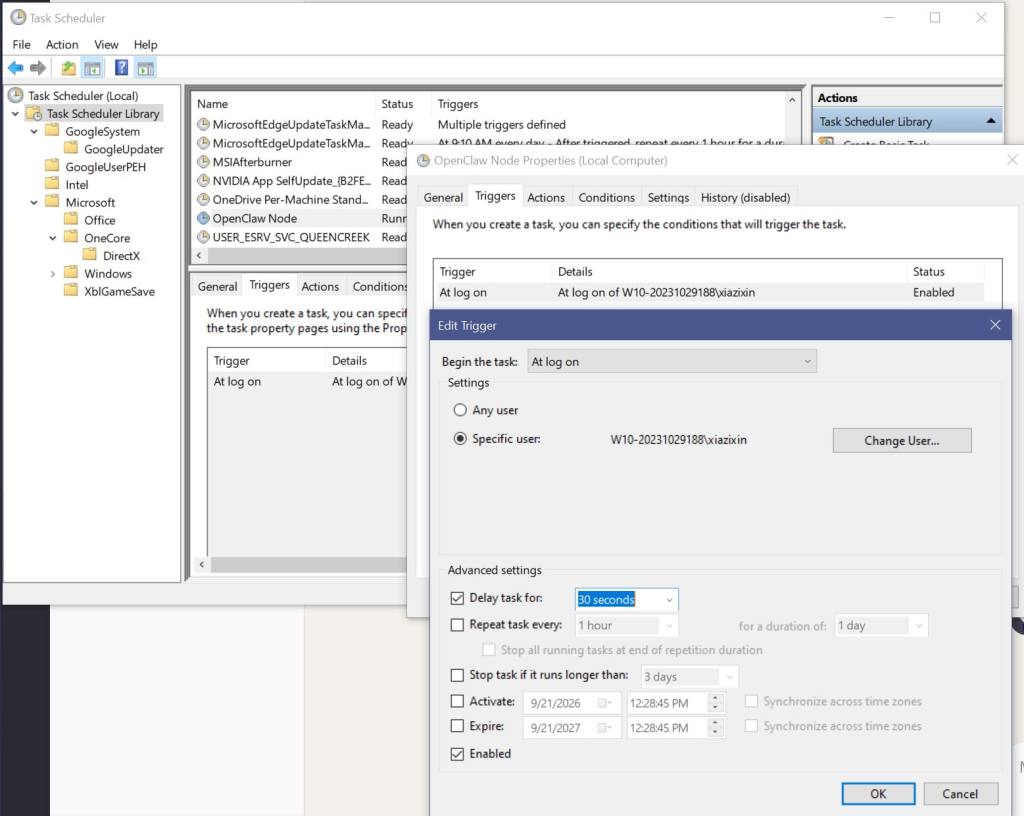
    Windows on a hand dose not have a system D, so to run task on boot you need to save a password, as windows does not have a login free shell.
    so we have 3 options.

    1. task manager startup (shell:startup)
    2. Windows script host (wscript.exe)
    3. task scheduler

    The issues with task manager is the need of been a .exe i think.
    the issue with wscript.exe been almost impossible to point the script to the wscript.exe. Also the timer delay after logon is actuall global by default, which is useless there is a USER level that over write the global value.

    now task scheduler, it runs immediately after logon, which some time runs before the windows explorer which will ended up failing.
    Windows don’t have a startup sequence, even steam workshop let us decide which mods to load first, seriously.
    but there is workaround.
  • Fix on zero package received in Open VPN

    Recently I started using OVPN to my home network to access local service like openclaw gateway.

    There is one bug, been zero package received after successful TCP connection. Initially I thought it TCP over TCP issues since I’m using the 5G cellular network to connect to the VPN.

    After Changing it to UDP, It still delivered zero package. After some digging the issue is on kernel IP forwarding been off.

    net.ipv4.ip_forward = 0

    And also having no NAT rules.

    iptables -t nat

    So what happen is basically Package sent to the Debian machine and no package been routed. Obviously, since no package been routed OVPN on my phone get zero package, hence the upload and download speed been zero.

  • Deepseek Vision lacks perspective and reference to the size within the same image

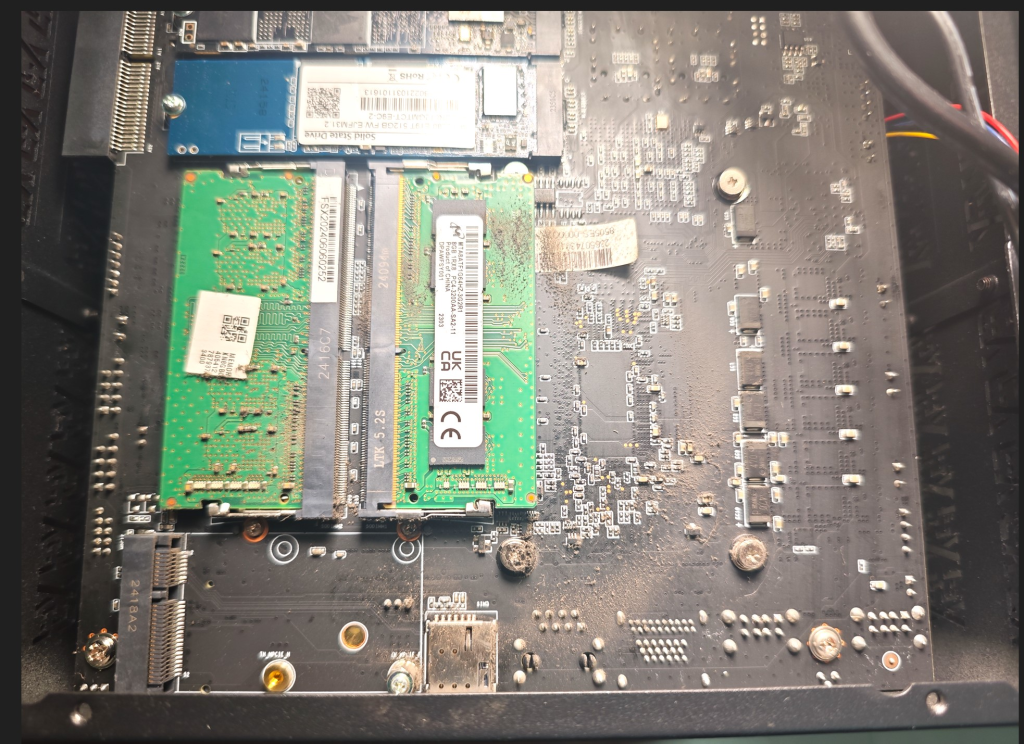
    So, recently DeepSeek updated vision. It still doesn’t know proportion. For example, if you place an M.2 B-key 3042/3052 beside an M-key. It will not be able to pick up the size difference of 2 slots.

    The actual test uses a 4 MB image. This one is 700 kb.


    Any human will be able to tell the empty slot is a rare B-key m.2, but the DeepSeek will just say it’s a 2242 slot like most AI.

    I know that a B-key isn’t a common M.2 slot. So training data may be limited. But there is literally an example of an M-key on top with a 2280 M.2 slotted in as a reference.

    So basically all the B-key 3042/3052 get hidden or just buried under the noise of 22 mm M.2 slots.

  • Stable diffusion model loadout

    I have been using Stable diffusion A1111 since 2022, and many things have changed since then. Back in the days, checkpoints consist of a text encoder, a Image auto encoder and decoder (VAE) and a U-net build in to the check point.

    The perks of that, is that when you download a checkpoint there is no need to configure the minor stuff.

    But, now with SDXL and with models like anima and other stuff. you need to download respective CLIP and VAE models. There are still many model that come with VAE, but to better switch models, I think it’s better to link the noodles with VAE loader, Clip loader.

  • OpenClaw windows node startup issues.

    Windows is well known for been unreliable when dealing with startup and background service. Having tired of the node running 50% of the time after each boot.

    So after migrating my OpenClaw gateway to Debian and setting Windows PC as a node, The node having many issues such as exec permission issues and startup process issue.

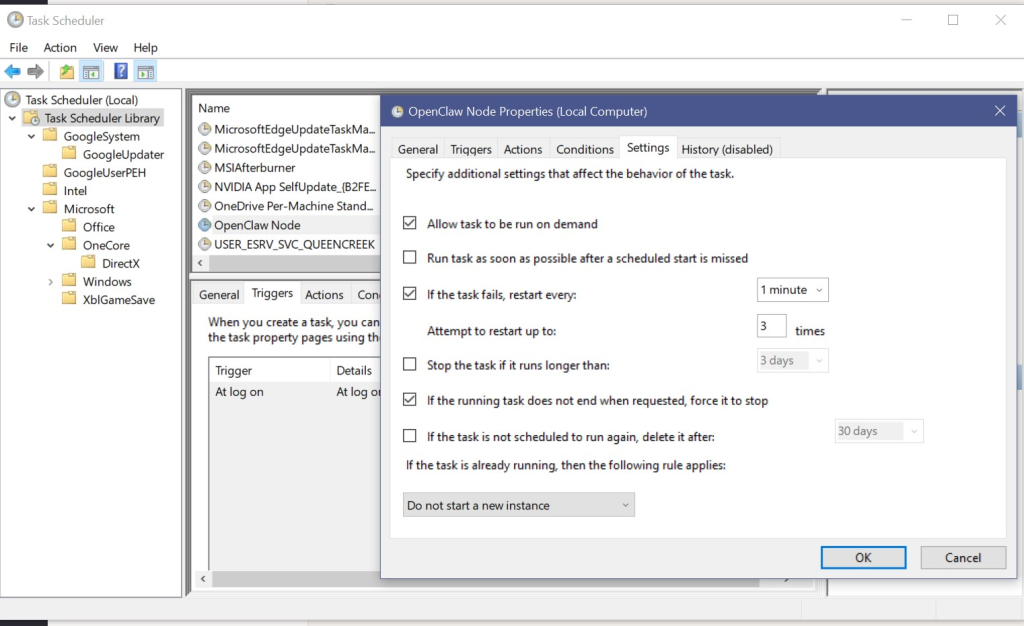
    So to fix the start-up issues of OpenClaw node start, I change the startup process to OpenClaw node run with a VBS wrapper and Task Scheduler.

    So basically

    Windows login -> Task Scheduler -> start-node.vbs -> start-node.bat -> node running into background

    With this it fixes the issue of node start’s inconsistency and accentually closing the terminal of node run.

  • WordPress Post limit.

    WordPress has a 2MB of post limit, Many posts online sates that methods includes plugins, .htaccess, etc.
    Which is not accurate, WordPress don’t use .htaccess except in debugs.

    To change post limit, just change the apache2.conf

    AllowOverride all

    this will allow php.ini to make change to the server.

    Then just edit the php.ini file.

  • PHP.ini mode constants.

    I have a aways thought that I could just use php in the wp-content/themes/themesname/functions.php and just add a line of ini_set() and change them however I like.

    But, then when I see some of my code didn’t work, for some reason there is a note on php.net and says that there is so called INI mode constants

    I kinda find this annoying, once again I need to change my php.ini and my .htaccess.

  • First post to the site

    first post to the site.

  • Hello world!

    Welcome to WordPress. This is your first post. Edit or delete it, then start writing!